
Using the PlaySmashZone Pickleball Scorekeeper is straightforward: set up the match, start playing, and tap the player or team that won each rally.
You do not need to decide whether that rally earned a point or changed the server. The Scorekeeper applies the selected scoring format, updates the serving state, and displays the next score call.
That distinction matters. Under standard scoring, the receiving side can win a rally without earning a point. You should still tap the receiving side because it won the rally.
This guide uses the 2026 USA Pickleball Official Rulebook as its scoring baseline. PlaySmashZone is an independent website; its Scorekeeper is not official USA Pickleball software and is not endorsed by USA Pickleball.
What Is the PlaySmashZone Pickleball Scorekeeper?
The PlaySmashZone Pickleball Scorekeeper is a browser-based tool for keeping track of singles and doubles matches.
Instead of asking you to manually work out every point, side out, service change, and server number, the tool uses one basic input: which player or team won the rally?
Based on that input and the selected format, it updates the match state.
The Scorekeeper supports:
- Singles and doubles
- Standard side-out scoring
- The 2026 provisional rally-scoring option
- Games to 11, 15, or 21 where supported
- One-game, best-of-three, and best-of-five matches
- Win-by-two finishes
- Local saved-match recovery
- Completed-game history
- Copying and, on compatible devices, sharing the final result
What the Scorekeeper Tracks for You
During a match, the Scorekeeper keeps the following information together:
- The current score
- Which side is serving
- The active player serving in doubles
- The server’s right or left court position
- Server 1 or Server 2 in standard doubles
- The score in the correct calling order
- The current game number
- Games won by each side
- Completed-game results
- Game-point and match-point status
- End-change reminders where applicable
- The last scoring action, so you can check what just happened
The live screen also tells the server to serve diagonally and shows whether the server should be in the right or left court.
How to Set Up a Match
Open the Scorekeeper and complete the Match Setup section before play begins.
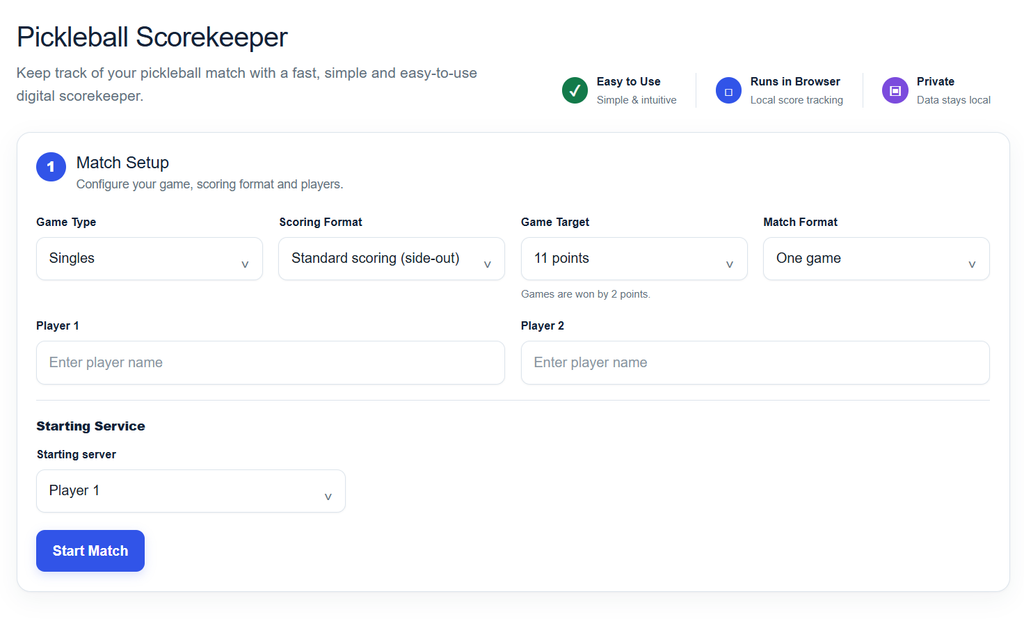
Choose Singles or Doubles
Select Singles for one player on each side.
Select Doubles for two players on each team. Doubles setup includes fields for:
- Two team names
- Two players on each team
- The team that serves first
- Each team’s starting server
Names can be left blank. The Scorekeeper will use labels such as Player 1, Player 2, Team 1, and Team 2.
Entering names is still useful because the live screen, game history, recovery message, and final result will then identify the players or teams more clearly.
Choose the Scoring Format
The Scorekeeper offers two scoring systems.
| Feature | Standard scoring | 2026 provisional rally scoring |
|---|---|---|
| Who earns a point? | Only the serving side can score | The side that wins every rally scores |
| Doubles service rotation | Normally Server 1 followed by Server 2 | One server before a side out |
| Standard doubles score call | Three numbers | Not applicable |
| Rally-scoring doubles score call | Not applicable | Two numbers |
| Status in the rules | Standard scoring method | Provisional option in the 2026 rules |
With standard scoring, winning a rally while receiving changes the service situation but does not add a point.
With provisional rally scoring, every rally produces a point. In doubles, one player serves during the team’s service rotation. If that team loses the rally, the opponents receive both the point and the serve.
Rally scoring is identified as provisional in the 2026 rulebook. If you are playing an organized or sanctioned event, use the scoring format assigned by the event rather than choosing a format independently.
Choose the Game Target
The available targets are 11, 15, and 21 points, subject to the selected format:
- A one-game standard match can be set to 11, 15, or 21.
- Standard best-of-three and best-of-five matches use 11-point games.
- The rally-scoring formats offered by the tool can use 11-, 15-, or 21-point games.
Every format offered by this Scorekeeper uses a win-by-two finish. Reaching the target is not enough if the lead is only one point. For example, a game to 11 cannot finish 11–10; play continues until one side leads by two.
These are the Scorekeeper’s available configurations. Tournament organizers may impose more specific format requirements.
Choose the Match Format
You can select:
- One game
- Best 2 of 3, won by the first side to win two games
- Best 3 of 5, won by the first side to win three games
For multi-game matches, the Scorekeeper records each completed game and displays the running match score.
Enter Player or Team Names
In singles, enter the two players’ names.
In doubles, you can enter a team name and two player names for each side. Player names are particularly helpful because the Scorekeeper identifies the active server, not just the serving team.
Names are limited to 40 characters. If you leave them blank, neutral default names are used.
Choose the Starting Server
For singles, choose which player serves first.
For doubles:
- Choose the starting team.
- Choose that team’s starting server.
- Choose the other team’s starting server.
The second choice may seem unnecessary before the receiving team has served, but it helps the Scorekeeper track that team’s correct positions when service changes.
When everything is ready, select Start Match.
How to Record Each Rally
After every rally, tap the player or team that won the rally.
Do not treat the two large buttons as ordinary “add one point” buttons. They tell the Scorekeeper who won the rally; the selected scoring system determines what happens next.
A practical rhythm is:
- Let the rally finish.
- Confirm which side won.
- Tap that side once.
- Read the feedback and serving information before the next serve.
The Scorekeeper may then:
- Add a point
- Transfer service to the opponent
- Move standard doubles service from Server 1 to Server 2
- Produce a side out
- Update the serving court
- Complete the game or match
What Happens When the Receiving Side Wins?
This is one of the most common sources of confusion for new players.
Under standard scoring, only the serving side can earn a point. If the receiver wins the rally, tap the receiving player or team anyway. The Scorekeeper will leave the numerical score unchanged and update the service state.
In standard singles, a receiving player who wins the rally becomes the new server. This is called a side out.
In standard doubles, the result depends on the current server:
- If Server 1 loses the rally, the serve moves to that player’s partner, who becomes Server 2.
- If Server 2 loses the rally, a side out occurs and the opponents receive the serve.
- During the opening service rotation of a game, the starting server is treated as Server 2. Therefore, losing that opening serve causes an immediate side out.
Under provisional rally scoring, the receiving side earns a point when it wins the rally and also becomes the serving side.
How the Scorekeeper Tracks Serving
Singles
In singles, the server’s score determines the serving position:
- An even server score, including zero, means serve from the right.
- An odd server score means serve from the left.
The Scorekeeper updates this position after each rally. The serving panel shows the player’s name and either Right court or Left court.
In standard singles, the server keeps serving after winning a point. If the server loses the rally, service passes to the opponent without a point being awarded.
Standard Doubles
Standard doubles normally gives each team two servers during a service rotation.
After a side out, the player correctly positioned on the right according to the team’s score becomes Server 1. That player serves until the team loses a rally. The partner then becomes Server 2.
When Server 2 loses a rally, service passes to the opponents.
Server 1 and Server 2 are therefore temporary roles for the current service rotation. They are not permanent labels attached to particular players.
The opening rotation is the exception. At the beginning of each game, the first serving team starts with only one server. The selected starting server is treated as Server 2, which is why the opening score is called 0-0-2.
The Scorekeeper also tracks which partner belongs on the right or left based on the team’s score and the selected starting server.
Provisional Rally-Scoring Doubles
Under the 2026 provisional rally-scoring option:
- The winner of every rally earns a point.
- The serving team has one server during its service rotation.
- When the serving team loses a rally, a side out occurs.
- The opponents receive the point and the serve.
- Service begins with the player correctly positioned on the right according to the new serving team’s score.
Because rally-scoring doubles uses one server per rotation, the tool does not display Server 1 or Server 2 for that format.
Understanding the Score Call
The score call is displayed from the serving side’s perspective. It can therefore appear in a different order from the two fixed score cards when service changes.
Singles
Singles uses two numbers:
- Server’s score
- Receiver’s score
A singles game begins at 0-0.
If the overall score is Player 1: 4 and Player 2: 6, and Player 2 is serving, the score call is 6-4.
Standard doubles
Standard doubles uses three numbers:
- Serving team’s score
- Receiving team’s score
- Current server number
A call of 7-5-1 means:
- The serving team has 7.
- The receiving team has 5.
- The first server in the serving team’s current rotation is serving.
The opening call is 0-0-2 because of the one-server opening exception.
Provisional rally-scoring doubles
Rally-scoring doubles uses two numbers:
- Serving team’s score
- Receiving team’s score
There is no third server number because only one player serves during each service rotation.
Example: Using the Scorekeeper During a Standard Doubles Game
Suppose Team A serves first in a standard doubles game. The opening call is:
0-0-2
Here is how five rallies would be entered.
- Team A wins the first rally.
Tap Team A. Because Team A was serving, it earns a point. The score call becomes 1-0-2. The same player continues serving, now from the left. - Team B wins the next rally.
Tap Team B. Team B was receiving, so it does not receive a point. Because Team A’s opening server was already Server 2, this produces a side out. Team B begins its service rotation at 0-1-1. - Team B wins while serving.
Tap Team B. Its score increases, producing 1-1-1. Team B’s Server 1 continues serving. - Team A wins the rally.
Tap Team A. No point is added because Team A was receiving. Service stays with Team B but passes to its partner. The call becomes 1-1-2. - Team A wins again.
Tap Team A. Team B’s Server 2 has now lost, so a side out occurs. Team A receives the serve and starts its normal rotation at 1-1-1.
This example shows why you should always tap the rally winner. Three of those taps changed the service state without necessarily adding a point to the side you tapped.
Game Point, Match Point, and Match Progress
As the score approaches a valid win, the live feedback can identify game-point and match-point situations.
The tool still enforces the win-by-two requirement. If the score reaches 10–10 in a game to 11, play continues until one side leads by two.
In a multi-game match, the live screen also displays:
- The current game number
- How many games each side has won
- The target for the current game
- Completed-game history
Match point is relevant only when winning the current game would also complete a best-of-three or best-of-five match.
What Happens When a Game Ends?
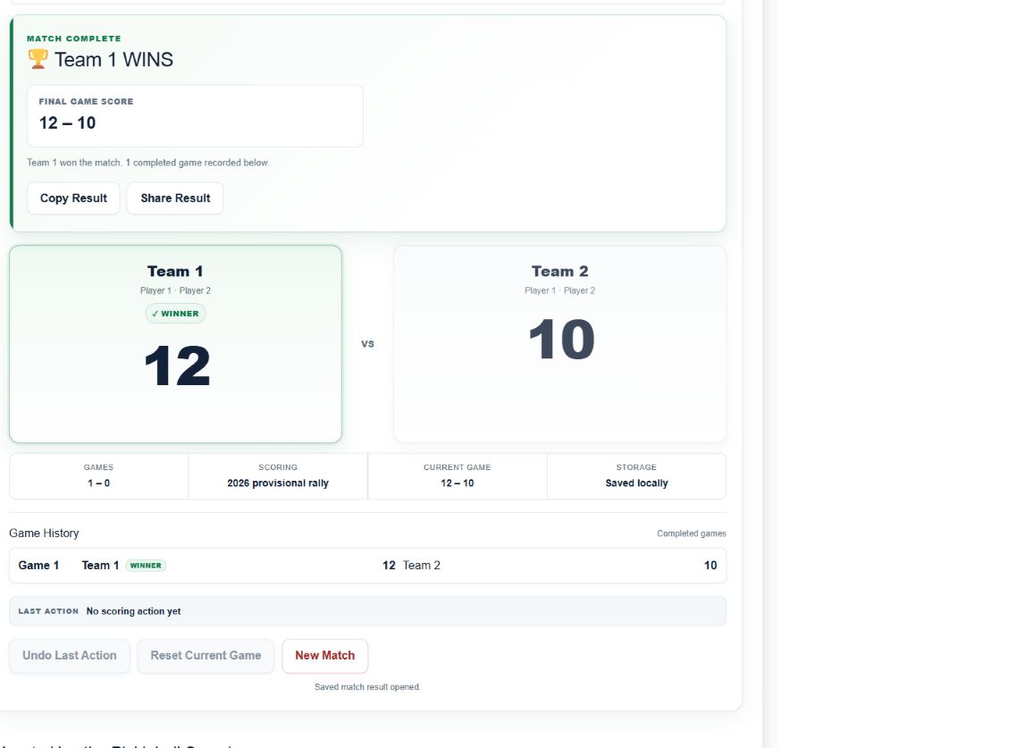
When a side reaches the target with a lead of at least two, the Scorekeeper completes the game and records it in Game History.
For a one-game match, the completed-result panel appears immediately.
For a best-of-three or best-of-five match that is not yet over:
- The completed game is added to Game History.
- A Start Next Game section appears.
- Initial service changes to the other side.
- In doubles, you can confirm each team’s starting server before continuing.
- Select Start Next Game when the players are ready.
The match ends after one side wins two games in a best-of-three or three games in a best-of-five.
How End Changes Are Tracked
The Scorekeeper displays an end-change reminder during a single-game match and during the deciding game of a multi-game match.
It uses these thresholds:
- Game to 11: change ends when the first side reaches 6.
- Game to 15: change ends when the first side reaches 8.
- Game to 21: change ends when the first side reaches 11.
The serving player remains the same after the end change.
These thresholds come from the 2026 tournament end-change provisions. The Scorekeeper uses them as its reminder baseline; it cannot detect whether players physically changed ends. For a casual match, agree beforehand whether you will follow tournament end-change procedure.
How to Fix a Mistake
The Scorekeeper provides three controls with different effects.
| Control | Use it when | What happens |
|---|---|---|
| Undo Last Action | You tapped the wrong side or entered a rally accidentally | Restores the score and serving state from immediately before the last tap |
| Reset Current Game | The current game needs to restart from 0-0 | Resets the active game but keeps previously completed games |
| New Match | You want to abandon the entire match and return to setup | Clears the match and its local saved state, then restores the default setup |
Undo Last Action
Undo reverses the complete last scoring action, not just a numerical point.
For example, if an incorrect tap caused Server 1 to become Server 2, Undo restores the earlier server. It can also reverse a side out or an accidental game-ending tap.
Reset Current Game
Reset Current Game returns the active game to 0-0 with its original starting service. Completed games in the current match remain in Game History.
A confirmation appears before the reset is applied.
New Match
New Match clears the current match, completed-game history, and locally saved match state. It then returns to a fresh setup screen.
This action also requires confirmation.
How Saved Match Recovery Works
When browser local storage is available, the Scorekeeper saves the current match state locally in that browser.
If you refresh or reopen the page in the same browser profile, you may see:
- Unfinished match found, with options to Resume Match or Discard Saved Match
- Saved match result found, with options to View Saved Result or discard it
Selecting Resume Match restores the saved score, game, serving side, and server state. Selecting View Saved Result reopens a completed result.
This storage is local. It is not:
- A PlaySmashZone account
- Cloud storage
- Cross-device synchronization
- A permanent online match archive
The saved state may be unavailable if you switch devices or browser profiles, use a private-browsing session, or clear the site’s browser data. The in-session Undo history is also not restored after reloading.
How to Copy or Share a Completed Result
After a match finishes, select Copy Result to copy a text summary containing:
- The winner
- The match score
- Each completed game score
- A link to the PlaySmashZone Scorekeeper
On devices and browsers that support native sharing, a Share Result button also appears. It opens the device’s normal sharing interface.
Share Result is not available on every browser. If native sharing is unavailable or cannot process the result, the Scorekeeper uses its copy behavior instead where possible.
What the Scorekeeper Does Not Do
The Scorekeeper tracks the match after you tell it who won the rally. It does not watch the court or independently decide whether a rally should be awarded.
It cannot determine:
- Whether a player committed a non-volley-zone or kitchen fault
- Whether a serve was legal
- Whether a ball touched a line
- Whether a double hit was legal
- Whether interference should be treated as a hinder
- Whether a rally should be replayed
- How another rule dispute should be resolved
If the rally result is unclear because of a rules question, resolve that question first. The PlaySmashZone Pickleball Rule & Fault Checker can help you examine common rule situations before you record the rally winner.
When Is the Scorekeeper Useful?
The Scorekeeper can be helpful for:
- Beginners learning how singles and doubles scoring work
- Casual games where nobody wants to track the service rotation mentally
- Practice matches
- Best-of-three or best-of-five matches
- Doubles games where players lose track of Server 1 and Server 2
- Games where players want a clear completed-game history
- Anyone who wants a result they can copy after the match
You do not need a digital scorekeeper for every game. Its main value is keeping the score, server, serving court, and match progress consistent while the players concentrate on the next rally.
Frequently Asked Questions
Should I tap the receiving side when it wins a rally?
Yes. Always tap the side that won the rally. Under standard scoring, the Scorekeeper will change the serving state without awarding the receiving side a point.
Why does standard doubles start at 0-0-2?
The team that begins the game has only one server during its opening service rotation. That starting player is designated Server 2, so the opening call is 0-0-2. Losing that serve produces a side out.
Are Server 1 and Server 2 permanent player numbers?
No. They are roles within the current service rotation. After each side out, the player correctly positioned on the right becomes Server 1 and the partner becomes Server 2.
Will a browser refresh erase my match?
Normally, the locally saved match will be detected when the page reloads, allowing you to resume it. Recovery depends on the same browser profile retaining the site’s local data.
Can I use rally scoring for doubles?
Yes. Select Provisional rally scoring (2026) during setup. Every rally awards a point, and doubles uses one server per service rotation. Confirm the permitted format before using rally scoring in an organized event.
Can I share the final result?
You can always attempt to copy the completed result. Share Result appears only where the browser or device provides a compatible native sharing feature.
Can the Scorekeeper decide whether a rally was a fault?
No. It records the winner you select. Use the Rule & Fault Checker or the applicable rulebook when a rally decision must be resolved first.
Start Keeping Score
Open the PlaySmashZone Pickleball Scorekeeper, set up the match, play the rally, and tap the side that won. The Scorekeeper will keep the scoring and serving state together through the final result.