How to Use the PlaySmashZone Pickleball Rule & Fault Checker: Step-by-Step Guide
To use the PlaySmashZone Pickleball Rule & Fault Checker, choose the situation closest to what happened, answer the guided questions using the actual facts of the rally, and read the resulting ruling, explanation, next action, and rule reference.
The accuracy of the result depends on the accuracy of your answers. Do not select an answer simply because it produces the ruling you want. If an important fact is uncertain, choose Not sure where available rather than guessing.
The checker uses the 2026 USA Pickleball Official Rulebook as its rules baseline. It is an independent PlaySmashZone educational tool, not official USA Pickleball software and not a replacement for a referee.
What Is the PlaySmashZone Pickleball Rule & Fault Checker?
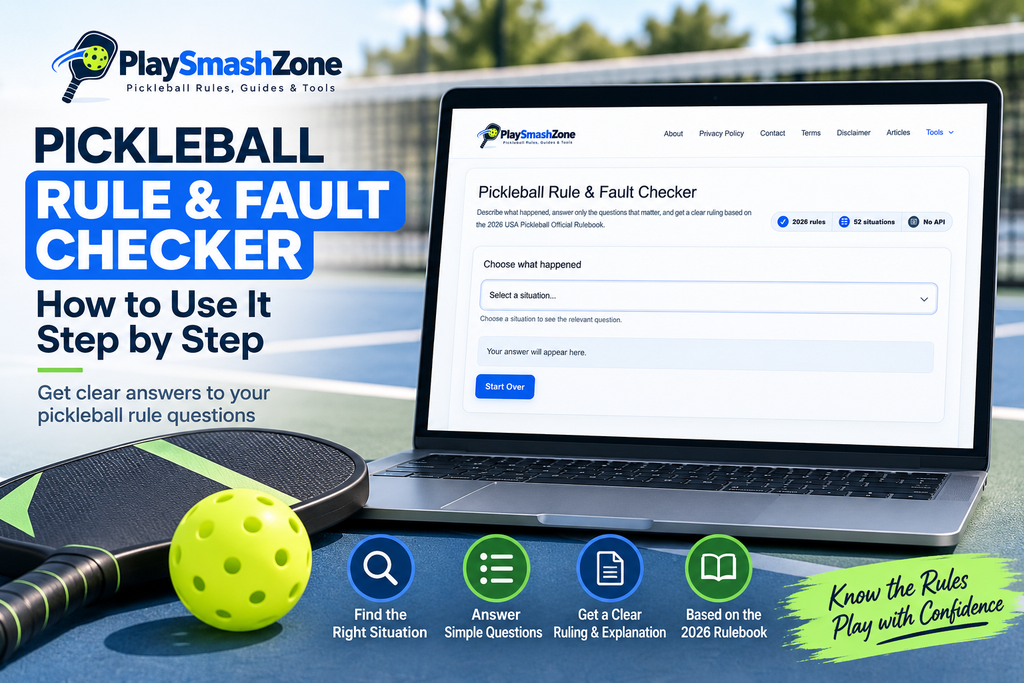
The Rule & Fault Checker is a browser-based decision tool for common pickleball situations.
Instead of making you search through an entire rulebook, it guides you through the facts that matter. Depending on the situation, it may ask about:
- Where a player or ball was positioned
- Whether the ball bounced
- What made contact with the court or net
- When a call was made
- Who served or returned the ball
- Whether the rally was still live
- Whether a match was officiated
- Whether an important detail is unknown
Your answers determine which rule path applies.
The final result can be:
- LEGAL
- FAULT
- REPLAY
- MORE INFORMATION NEEDED
The result also explains why that category applies and shows the relevant 2026 rule reference.
What Can the Rule & Fault Checker Help With?
The checker contains 52 common situations organized into nine categories:
- Kitchen and non-volley-zone situations
- Serving
- The two-bounce rule
- Balls that are in, out, or still in play
- Paddle and ball contact
- Net and court situations
- Player positions and score calls
- Calls, hinders, and disputes
- Other rally situations
Examples include kitchen contact during a volley, serving-position problems, an incorrect receiver, line calls, net contact, double hits, permanent objects, hinders, balls travelling around the net post, and unusual interference.
The checker does not cover every event that could possibly occur. Its purpose is to help with the defined situations and fact patterns included in the tool.
How to Use the Rule & Fault Checker
Step 1: Choose the Situation Closest to What Happened
Select Choose what happened, then browse the available situations or use the search field.
The search accepts ordinary language. You can enter phrases such as:
touched the netwrong person returned the serveball went around the postkitchenwrong score
The search filters the existing situations. It does not treat your text as a complete description or generate a ruling directly from it.
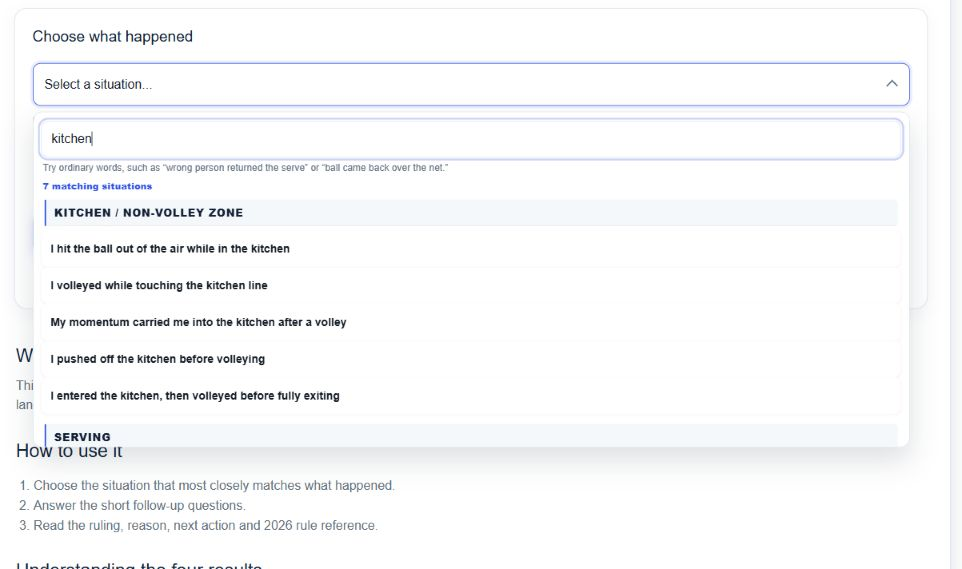
Choose the option that most closely describes the event you are checking. Select according to what happened, not according to the result you expect.
If none of the displayed situations fits, try a shorter search using the main object or action involved. For example, replace a long description with net, serve, line call, or double hit.
Step 2: Answer the Questions Carefully
After you select a situation, the checker displays the first relevant question and a progress indicator.
Some situations require one question. Others open additional questions based on earlier answers. This prevents you from having to answer details that do not apply to your situation.
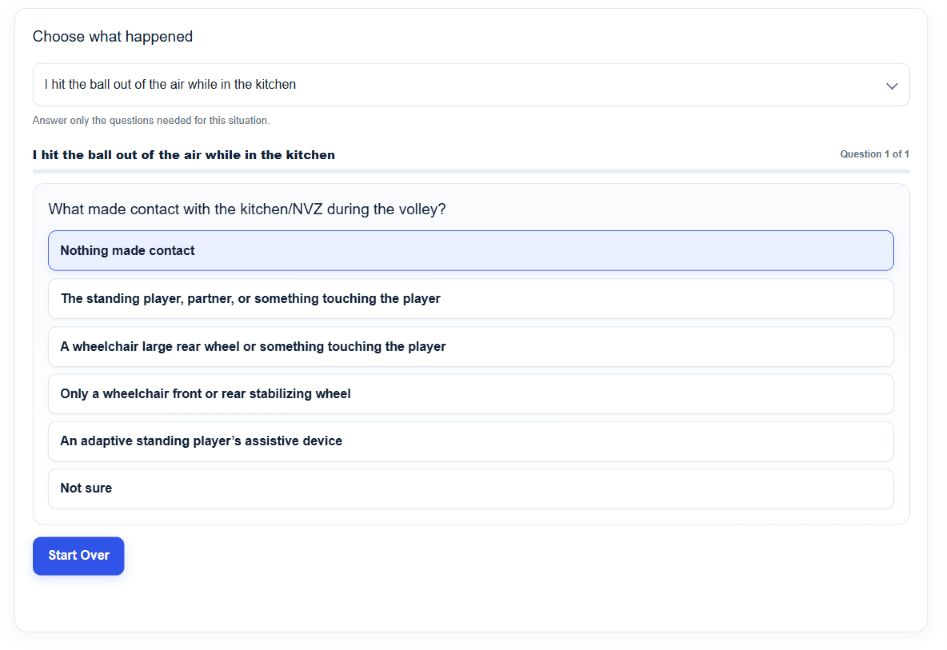
Read every option before choosing. A small factual difference can change the result.
Depending on the situation, the checker may need to know:
- Whether contact happened during a volley
- Whether the ball crossed the net
- Whether it bounced before an object was contacted
- Whether a player stopped the rally
- Whether a call was made before the next serve
- Whether the match was officiated
- Whether the correct players were positioned correctly when the score was called
Use Not sure when you genuinely do not know a material fact. The checker may then identify what must be confirmed before a supported ruling is possible.
If you realize that an earlier answer was wrong, use Back. The previous question and its answer choices will be restored so you can correct the path.
Step 3: Read the Result
After the necessary questions have been answered, the result panel displays four important pieces of information:
- Ruling — LEGAL, FAULT, REPLAY, or MORE INFORMATION NEEDED
- Why? — the factual reason for the result
- What happens next? — the action indicated by that rule path
- Official rule reference — the applicable reference from the 2026 rulebook
When the result is MORE INFORMATION NEEDED, the “What happens next?” heading changes to What to confirm. This tells you which missing fact is preventing a reliable ruling.
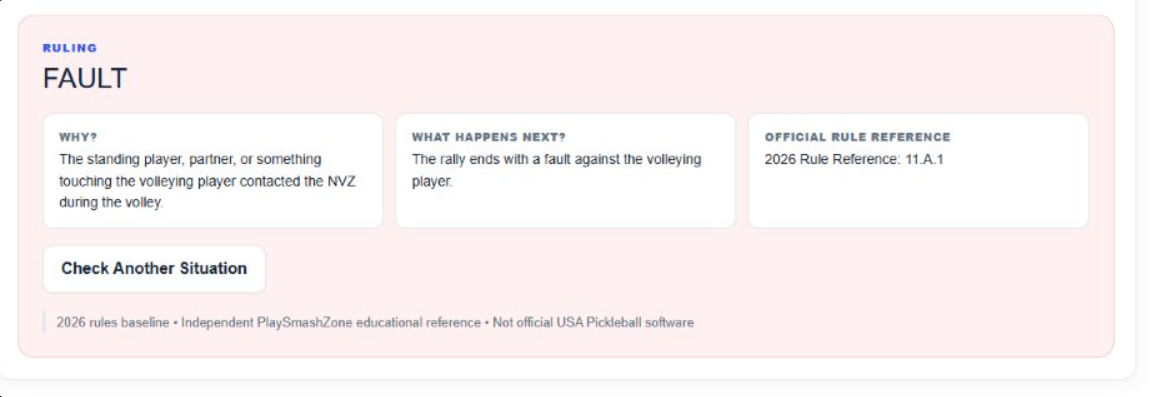
Read the explanation, not only the result label. A ruling applies to the specific condition you checked and the answers you provided.
For example, a LEGAL result means that the checked condition did not establish a fault. It does not prove that every other part of the rally was legal.
Step 4: Check Another Situation
Select Check Another Situation from the result panel to clear the current path and return to the situation selector.
You can also use Start Over while answering questions. This clears the selected situation, previous answers, search text, and result.
Use Start Over when you chose the wrong situation entirely. Use Back when the situation is correct but one of your answers needs to change.
What Do the Four Results Mean?
| Result | Meaning |
|---|---|
| LEGAL | The facts entered do not establish a fault or replay for the specific condition being checked. Another issue elsewhere in the rally could still require separate consideration. |
| FAULT | The answers establish a fault under the applicable rule path. Read “What happens next?” to see who is faulted or how the rally or serve is handled. |
| REPLAY | The applicable rule path requires the rally or serve situation to be replayed. The explanation may include timing or procedural conditions that must be satisfied. |
| MORE INFORMATION NEEDED | The available facts are insufficient for a reliable ruling. The checker identifies the missing fact instead of guessing. |
MORE INFORMATION NEEDED is not a technical error. In many rule situations, it is the most responsible result when timing, position, contact, or another decisive fact cannot be confirmed.
Why the Follow-Up Questions Matter
Pickleball rulings often depend on more than the first description of an event.
Consider the statement: “The wrong player returned the serve.”
That description alone may not be enough. The result can depend on:
- Whether the correct server and receiver were correctly positioned when the score was called
- Whether a different player actually returned the serve
- Whether the problem was identified during or after the rally
- Whether an incorrect-receiver fault was called before the next serve
If the correct players were not correctly positioned and the error was properly identified while the rally was stopped, the rule path can produce a replay.
If a position problem is discovered only after the rally has been completed, the completed rally may stand.
If the correct server and receiver were positioned correctly but a different player returned the serve, an incorrect-receiver fault can apply when it is called within the required time.
These outcomes sound similar in casual conversation, but the timing and position facts are different. That is why the checker asks follow-up questions rather than assigning a result from the situation title alone.
Example 1: Checking a Kitchen or Non-Volley-Zone Situation
Suppose a standing player hits the ball out of the air—a volley—and steps in the kitchen during that volley.
Here is how to check it:
- Search for
kitchen. - Choose I hit the ball out of the air while in the kitchen.
- Read the question: What made contact with the kitchen/NVZ during the volley?
- Select The standing player, partner, or something touching the player.
- The checker returns FAULT.
- The explanation says that the standing player, partner, or something touching the volleying player contacted the non-volley zone during the volley.
- “What happens next?” states that the rally ends with a fault against the volleying player.
- The displayed reference is 2026 Rule Reference: 11.A.1.
Rule 11.A.1 covers qualifying non-volley-zone contact by a volleying player or something in contact with that player.
This does not mean that every kitchen-related situation is automatically a fault. Being in the kitchen is not itself prohibited. The relevant question is whether the player volleyed and whether qualifying contact occurred during the act of volleying or through the player’s volley momentum.
Example 2: When the Tool Needs More Information
Suppose someone says that the wrong player returned the serve, but nobody is certain whether the original server and receiver were correctly positioned when the score was called.
Use this path:
- Select The wrong player returned the serve.
- The first question asks whether the correct server and receiver were in their correct positions when the score was called.
- Select Not sure.
- The checker returns MORE INFORMATION NEEDED.
- The explanation states that the server and receiver position facts are not clear enough.
- “What to confirm” asks you to determine whether the correct players were correctly positioned at the score call.
- The result refers to Rules 5.C.1 and 5.C.2.
Guessing “Yes” or “No” could send the decision down the wrong path. The correct next step is to establish the missing position fact, if possible.
If that fact cannot be established and an official ruling is required, follow the referee or event procedure that applies to the match.
How Rule References Work
The result panel shows the rule references used for the selected path. For example, the kitchen-volley result above displays Rule 11.A.1.
These references allow you to find and verify the underlying provision in the 2026 USA Pickleball Official Rulebook.
The checker’s explanations are written as practical paraphrases. They are intended to help readers understand the result, but the official rulebook remains the authoritative source for the rule itself.
Some situations may also depend on:
- Tournament procedures
- Officiated versus non-officiated play
- Timing requirements
- Adaptive or wheelchair provisions
- Exceptions elsewhere in the rulebook
The checker asks about those distinctions when they are material to a supported decision path.
What If I Am Not Sure About an Answer?
Choose Not sure when the fact is genuinely unknown.
Do not choose the answer that seems most likely simply to force a LEGAL, FAULT, or REPLAY result. An unsupported answer produces an unsupported ruling.
When the checker returns MORE INFORMATION NEEDED:
- Read the “What to confirm” section.
- Identify the missing fact.
- Ask the players, referee, or other appropriate person if that fact can be established.
- Use Back to revise the answer, or Start Over and check the situation again.
- If the fact cannot be established, do not present the checker’s conditional path as a definite official ruling.
In a tournament or officiated match, use the event’s referee and appeal procedures when an official decision is required.
What the Rule & Fault Checker Does Not Do
The checker cannot:
- Watch the rally
- Determine what physically happened
- Verify that the user’s description is accurate
- Decide which witness is correct
- Replace an official referee
- Require tournament officials or other players to accept its result
- Resolve events outside its supported scenarios and facts
- Automatically send a rally result to the Scorekeeper
The tool evaluates the situation and answers you provide. If the starting facts are wrong or incomplete, the resulting path may not match the actual event.
Rule Checker vs Scorekeeper: Which Tool Should I Use?
| Tool | Use it when your question is… | What it provides |
|---|---|---|
| Rule & Fault Checker | “What does the rule say about what just happened?” | A fact-guided ruling, explanation, next action, and rule reference |
| Scorekeeper | “Who scored, who serves, and what is the current match state?” | Score, serving side, active server, position, game history, and match progress |
If a rally produces a rules dispute, use the Rule & Fault Checker to understand the relevant rule first. After the outcome has been determined, return to the PlaySmashZone Pickleball Scorekeeper and record the side that won the rally.
The tools do not exchange match information automatically.
When Is the Rule & Fault Checker Useful?
The checker can help when:
- Players in a casual game disagree about a common situation
- A beginner wants to understand why an action was legal or a fault
- Someone wants to verify a rule after a rally
- Players need to identify which fact changes the ruling
- A situation may require a replay
- A user wants a rule reference for further reading
- A group wants to discuss the rule calmly after play
It is an educational aid. An official referee or applicable event procedure remains the appropriate authority when an official match decision is required.
Frequently Asked Questions
Is the Rule & Fault Checker official USA Pickleball software?
No. It is an independent PlaySmashZone educational tool. It is not sponsored or endorsed by USA Pickleball.
Does the checker use the 2026 rulebook?
Yes. Its production rules baseline is the 2026 USA Pickleball Official Rulebook, and the result panel displays relevant 2026 rule references.
What does MORE INFORMATION NEEDED mean?
It means a material fact is missing or uncertain, so the checker cannot support a definite ruling. Read “What to confirm” to see which fact is needed.
Can the checker replace a referee?
No. It cannot observe the rally, verify the user’s description, or issue a binding official decision.
Can it check every possible pickleball dispute?
No. It covers a defined set of common situations. An event outside those situations may require direct consultation of the rulebook or an official.
Can I change an earlier answer?
Yes. Use Back to return to the previous question. Use Start Over if you need to clear the entire situation and begin again.
Can I check another situation after receiving a result?
Yes. Select Check Another Situation to return to the selector with the previous path cleared.
Check a Pickleball Situation
Open the PlaySmashZone Pickleball Rule & Fault Checker, choose the situation that matches what happened, and answer each question using the known facts. Then use the result, explanation, and rule reference to understand the applicable rule.